One-off purchase, no subscription. For: Businesses and associations.
Buy and downloadAlso included to the Entrepreneur Package: all 10 tools €29 + VAT.
Coming soonIncluded in Pro membership – all 30 tools €9.90/month + VAT, 14 days free →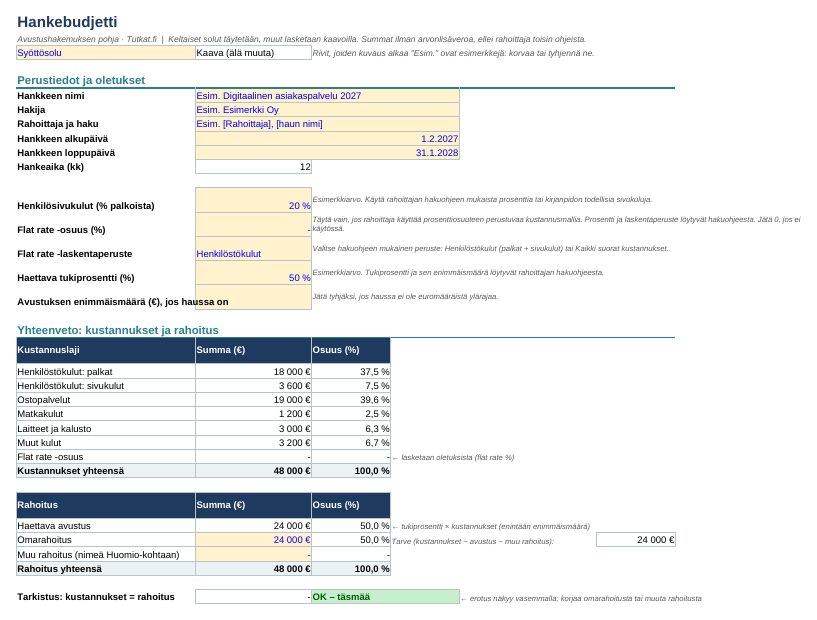
Contents
- Project application structure with 13 sections, filling instructions and examples
- Project budget: personnel, purchased services, travel, equipment, flat rate and own funding
- Automatic budget reconciliation check
- 24-month schedule (Gantt)
- Pre-sending checklist, de minimis information
User guide and information
How to get started
- Read the funder's call for applications and application instructions. They always take precedence. If the funder has its own form or online service, use it and transfer the texts from this template into its fields.
- First fill in Hankebudjetti.xlsx (Budget and Schedule).
- Write the application text in the Hakemuspohja.docx file. Replace the examples with your own text and delete the filling instructions before sending.
- Finally, go through the Checklist tab.
In Excel, the yellow cells are input cells and the others are calculated with formulas. Rows starting with "Esim." are examples: replace or clear them.
Technical details
- Works in Microsoft Word and Excel (2010 or newer), LibreOffice, and for the most part also in Google Docs and Google Sheets.
- No macros, no external links.
- Amounts in euros. Enter costs excluding value added tax unless the funder's instructions say otherwise.
Verified information
The general maximum amount of de minimis aid is 300 000 euros per undertaking over any three-year period (Commission Regulation (EU) 2023/2831, Article 3(2)). Certain sectors have their own rules. Checked 10/2026.
Discharge from liability
The templates are general aids for structuring and budgeting an application. They are not legal, tax, accounting or financial advice and do not guarantee that a grant will be awarded. The companies, persons and figures in the examples are fictitious, and the example values (e.g. social security contribution and subsidy percentage) are illustrative. The user is responsible for the content of the application, the calculations and compliance with the funder's terms.
How you get the files
- Log in or create a free Tutkat account.
- Pay by card or mobile payment at Stripe's secure checkout.
- Download the files straight away from the My account page. The download is always available to you when you log in.
Also read: free guides
Related radars
Frequently asked questions
Which program opens the files?
Excel files work in Excel and LibreOffice, Word files in Word and LibreOffice. There are no macros.
Do I get a receipt?
Yes. The payment service sends a receipt to your email. The seller is Mojo Company Finland Oy (Business ID 2393510-8).
Can I cancel a purchase?
Delivery of digital content begins immediately, so the right of withdrawal ends when the download begins. If the file is faulty, we will correct or refund it. Read terms of delivery.