One-off purchase, no subscription. For: Households.
Buy and downloadAlso included To the Home Bundle: all 20 tools €14.90.
Coming soonIncluded in Pro membership – all 30 tools €9.90/month + VAT, 14 days free →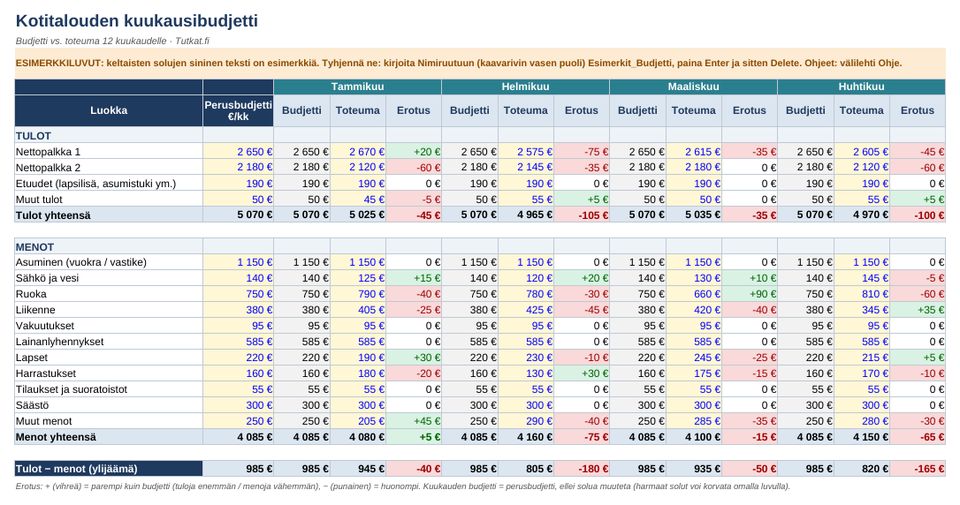
Contents
- Monthly budget for 12 months: budget, actual, difference and chart
- Savings goals and the monthly saving required
- Debt plan: avalanche vs. snowball, repayment time and interest
- Emergency buffer calculator
User guide and information
Tabs
- Monthly budget Income and expenses in 11 expense categories, budget vs. actual for 12 months, colour-coded difference, annual summary, expense shares (%) and chart.
- Savings goals: target amount, target date, current savings: the file calculates the monthly saving required and progress.
- Debt plan Up to 8 debts. Compares the avalanche strategy (highest interest first) and the snowball strategy (smallest balance first): debt-free month, interest paid and a monthly payment plan for up to 120 months.
- Buffer Emergency fund calculator: essential monthly expenses × the number of months you choose.
- Guide User guide, calculation assumptions and disclaimer.
Quick guide
- Open the file in Excel (2010 or newer, also Microsoft 365), LibreOffice Calc or Google Sheets.
- Clear the example figures: type one of the following names in the Name Box (to the left of the formula bar), press Enter, then Delete: Esimerkit_Budjetti Esimerkit_Saastot Esimerkit_Velat Esimerkit_Puskuri In Google Sheets, select the yellow cells with the mouse and press Delete.
- Enter your own details in the yellow cells (blue text). The other cells are calculated with formulas.
- Save the file under your own name.
The file contains no macros or external links. The debt plan calculation is done on two hidden helper sheets that do not need to be edited.
Discharge from liability
The tool is intended for planning and illustrating your own finances. It is not investment, financial, loan, debt or legal advice. The calculations are based on the information you enter and on simplified assumptions (e.g. loan costs and interest rate changes are not taken into account). Always check loan terms with the creditor.
Free financial and debt advice
The economic and debt advice provided by the state legal aid offices is free of charge and confidential. The service is organised by the Legal Services Agency (Oikeuspalveluvirasto). www.oikeuspalveluvirasto.fi/talous-ja-velkaneuvonta www.oikeus.fi (Teemat > Maksuvaikeudet ja velat)
How you get the files
- Log in or create a free Tutkat account.
- Pay by card or mobile payment at Stripe's secure checkout.
- Download the files straight away from the My account page. The download is always available to you when you log in.
Also read: free guides
Related radars
Frequently asked questions
Which program opens the files?
Excel files work in Excel and LibreOffice, Word files in Word and LibreOffice. There are no macros.
Do I get a receipt?
Yes. The payment service sends a receipt to your email. The seller is Mojo Company Finland Oy (Business ID 2393510-8).
Can I cancel a purchase?
Delivery of digital content begins immediately, so the right of withdrawal ends when the download begins. If the file is faulty, we will correct or refund it. Read terms of delivery.