2,90 € incl. VAT 25,5 %
One-off purchase, no subscription. For: Employees.
Buy and downloadAlso included To the Home Bundle: all 20 tools €14.90.
Coming soonIncluded in Pro membership – all 30 tools €9.90/month + VAT, 14 days free →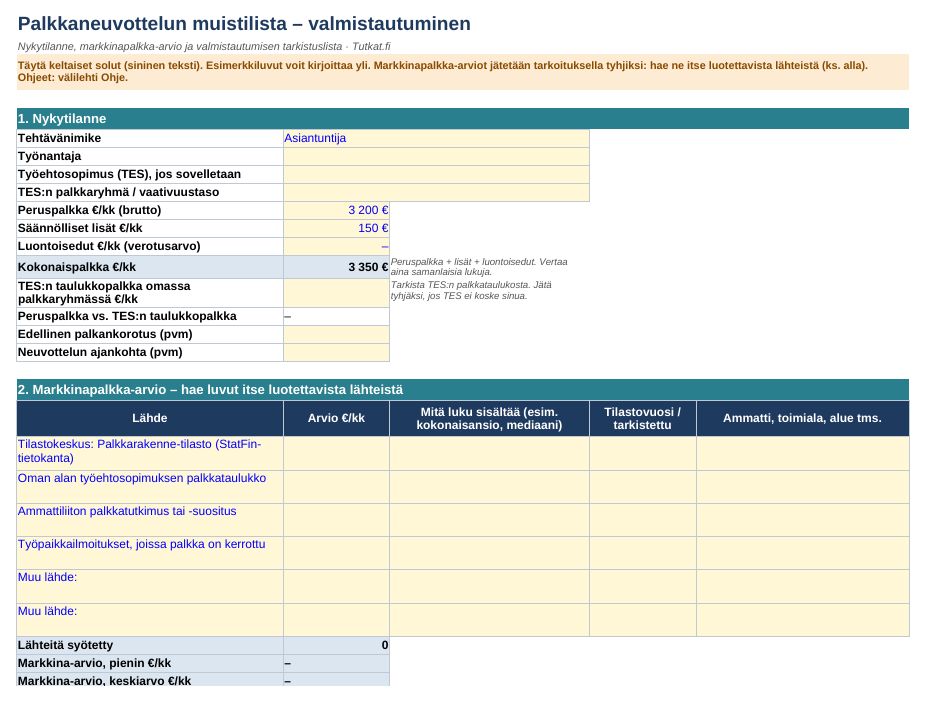
Contents
- Preparation and sources of market pay
- Evidence table of achievements
- Request, target and minimum calculator in €/month and €/year
- How the negotiation goes and follow-up booking
User guide and information
Quick guide
- Open the file in Excel (2010 or newer), LibreOffice Calc or Google Sheets. Save it under your own name.
- Fill in the yellow cells (blue text) one sheet at a time.
- Look up market salary estimates yourself: Statistics Finland's Palkkarakennetilasto (stat.fi/tilasto/pra, StatFin), the collective agreement for your field (generally binding collective agreements: finlex.fi) and trade union salary surveys. The file does not contain salary statistics.
- Print Course of the negotiation and Questions for the meeting (A4).
The file contains no macros or external links.
Discharge from liability
A tool for preparing for negotiations. Not legal, employment law, tax or career planning advice. Calculations are based on the information you enter (gross amounts, taxation not taken into account).
How you get the files
- Log in or create a free Tutkat account.
- Pay by card or mobile payment at Stripe's secure checkout.
- Download the files straight away from the My account page. The download is always available to you when you log in.
Also read: free guides
- Pay rise request: template message and arguments
- Employer's social security costs 2026: what an employee really costs
- What is a good salary in Finland? How to compare your pay with the statistics
- From gross salary to net salary 2026: employee contributions and tax card
- Mileage allowance and daily allowances 2026: tax-free travel allowances
Related radars
Frequently asked questions
Which program opens the files?
Excel files work in Excel and LibreOffice, Word files in Word and LibreOffice. There are no macros.
Do I get a receipt?
Yes. The payment service sends a receipt to your email. The seller is Mojo Company Finland Oy (Business ID 2393510-8).
Can I cancel a purchase?
Delivery of digital content begins immediately, so the right of withdrawal ends when the download begins. If the file is faulty, we will correct or refund it. Read terms of delivery.