One-off purchase, no subscription. For: Christmas party organisers.
Buy and downloadAlso included To the Home Bundle: all 21 tools €14.90.
Coming soonIncluded in Pro membership – all 30 tools €9.90/month + VAT, 14 days free →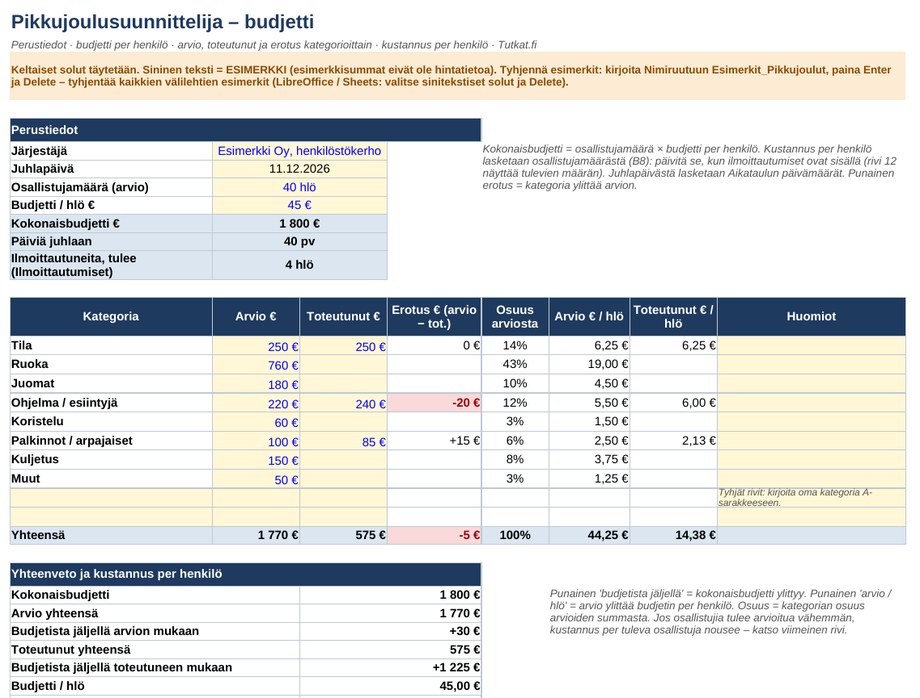
Contents
- Budget in 8 categories: estimate, actual, difference and cost per person
- Task list from 10 weeks out to the party day, dates calculated from the party date and overdue tasks in red
- Sign-ups for 150 rows: attending, dietary requirements, non-alcoholic drink and transport, with summaries
- Catering calculator: quantities from the number of participants with editable multipliers
- Three invitation templates (workplace, group of friends, association), reminder message and venue checklist (Word)
User guide and information
Quick guide
- Clear the examples. Excel: type Esimerkit_Pikkujoulut in the Name Box (left of the formula bar), press Enter and then Delete. LibreOffice and Google Sheets: select the blue-text cells and press Delete. Blue text = example.
- Enter the party date, number of participants and budget per person in the Budget sheet – the schedule dates update automatically.
- Record the sign-ups; the catering calculator works out quantities from the estimate or from the sign-ups.
- Mark tasks as done and record actual costs in the Budget sheet.
- Open Kutsupohjat.docx, replace the items in square brackets and send the invitation.
Other spreadsheet programs
All formulas work in LibreOffice Calc and Google Sheets. In Google Sheets, open the file in Drive: File > Import, or open the .xlsx directly. The named range can also be used in LibreOffice (Sheet > Named Ranges), but selecting and clearing the blue-text cells is easiest.
Discharge from liability
The template is a planning aid. The sample amounts, participants and schedules are examples, not price information or recommendations. Catering quantities are editable starting values. The seller is not liable for decisions or agreements made on the basis of the template.
How you get the files
- Log in or create a free Tutkat account.
- Pay by card or mobile payment at Stripe's secure checkout.
- Download the files straight away from the My account page. The download is always available to you when you log in.
Also read: free guides
Related radars
Frequently asked questions
Which program opens the files?
Excel files work in Excel and LibreOffice, Word files in Word and LibreOffice. There are no macros.
Do I get a receipt?
Yes. The payment service sends a receipt to your email. The seller is Mojo Company Finland Oy (Business ID 2393510-8).
Can I cancel a purchase?
Delivery of digital content begins immediately, so the right of withdrawal ends when the download begins. If the file is faulty, we will correct or refund it. Read terms of delivery.