One-off purchase, no subscription. For: Households.
Buy and downloadAlso included To the Home Bundle: all 20 tools €14.90.
Coming soonIncluded in Pro membership – all 30 tools €9.90/month + VAT, 14 days free →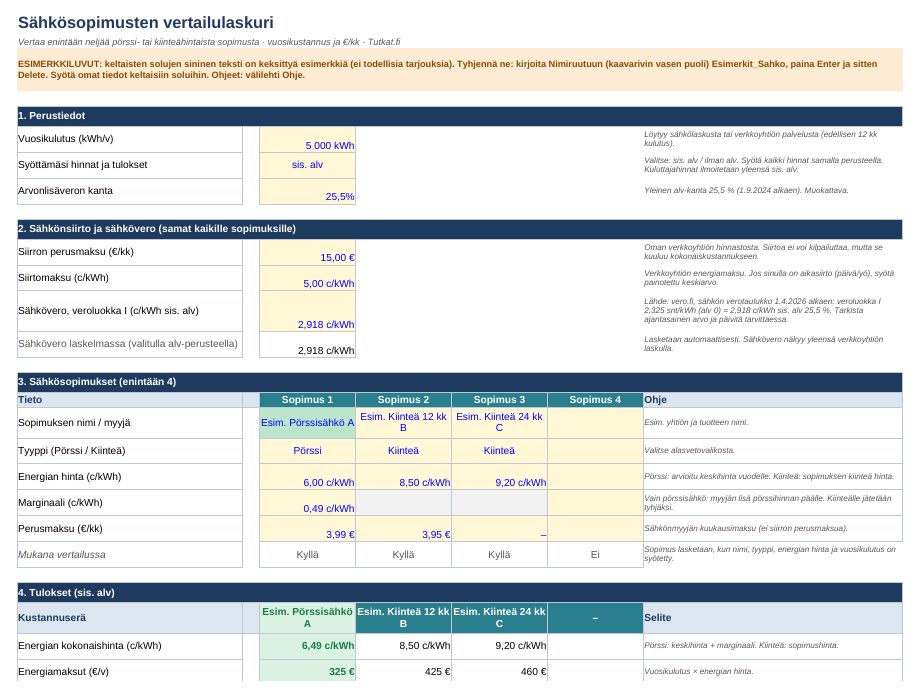
Contents
- Four agreements side by side: spot or fixed
- Distribution and electricity tax included
- Annual cost, €/month and cheapest automatically
- Monthly distribution
User guide and information
Quick guide
- Open the file in Excel, LibreOffice Calc or Google Sheets.
- Clear the example figures: type Esimerkit_Sahko in the Name Box, press Enter, then Delete.
- Enter your own details in the yellow cells (blue text).
- Choose whether the prices you enter include VAT or exclude VAT.
Electricity tax
Default value 2.918 c/kWh incl. VAT 25.5% (tax class I). Source: vero.fi, electricity tax table from 1.4.2026: 2.325 c/kWh VAT 0 (energy tax 2.24 + security of supply fee 0.085). The value is editable if the tax changes.
The file contains no macros or external links.
Discharge from liability
The calculator is a comparison aid, not financial advice. The result for spot-price electricity is an estimate. Always check prices and terms with the electricity supplier and the network company.
How you get the files
- Log in or create a free Tutkat account.
- Pay by card or mobile payment at Stripe's secure checkout.
- Download the files straight away from the My account page. The download is always available to you when you log in.
Also read: free guides
- Spot electricity or a fixed price? How a spot-price contract works
- Electricity transmission price: why transmission costs money and what an electricity bill consists of
- Electricity price in winter: why spot electricity gets more expensive and how to prepare
- How much does electricity cost per month? Detached house and block of flats 2026
- Switching electricity contract: how to compare and switch electricity companies
Related radars
Frequently asked questions
Which program opens the files?
Excel files work in Excel and LibreOffice, Word files in Word and LibreOffice. There are no macros.
Do I get a receipt?
Yes. The payment service sends a receipt to your email. The seller is Mojo Company Finland Oy (Business ID 2393510-8).
Can I cancel a purchase?
Delivery of digital content begins immediately, so the right of withdrawal ends when the download begins. If the file is faulty, we will correct or refund it. Read terms of delivery.